Baby Monitor vs Security Camera: A UK Dad’s Honest Take on Both
A few weeks ago, I went to fetch my son for tea and found his bedroom door shut. From the other side: “Daddy, don’t come in yet, I’m playing.” He’s four and a half. That moment was the first time I realised we’d left baby-monitor territory for good – and walked straight into a different question. Not whether we needed eyes on him at night anymore, but whether what comes next is a baby monitor at all, or something else entirely.
If you’ve typed baby monitor vs security camera into Google, you’re probably standing where I’m standing. Your child’s grown up enough that the dedicated parent unit feels like overkill. But you’re not ready to leave them with no visibility either — especially in a UK house where you can’t always hear what’s going on two rooms away.
This post isn’t a product round-up dressed up as a comparison. It’s the actual thinking I’ve been doing for my son’s room: what’s the real difference between the two categories, when each one wins, and the bit most articles skip — what UK privacy law (the PSTI Act 2022) actually requires of any camera you put in your child’s room.
Stick around for the conversation I’m planning to have with my four-year-old before I plug anything in.
Table of Contents
Baby Monitor vs Security Camera: What’s Actually the Difference?
On the shelf at Argos they look similar. Both are little plastic boxes with a lens and a microphone. The marketing language overlaps too — “see your baby anywhere”, “two-way audio”, “night vision”.
Underneath, they’re built for completely different jobs.
How They’re Built
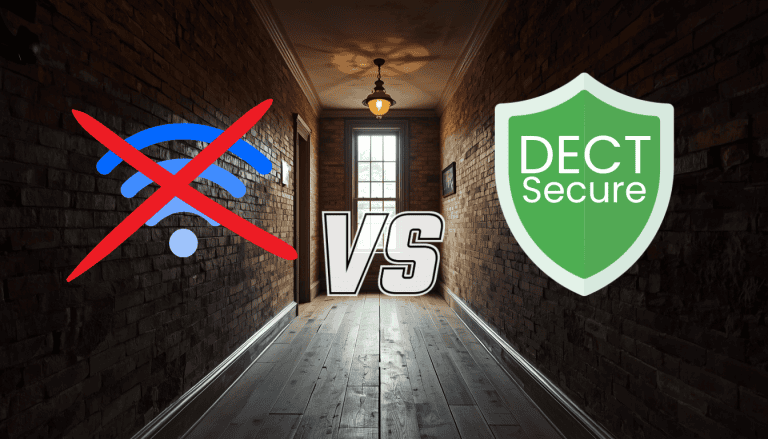
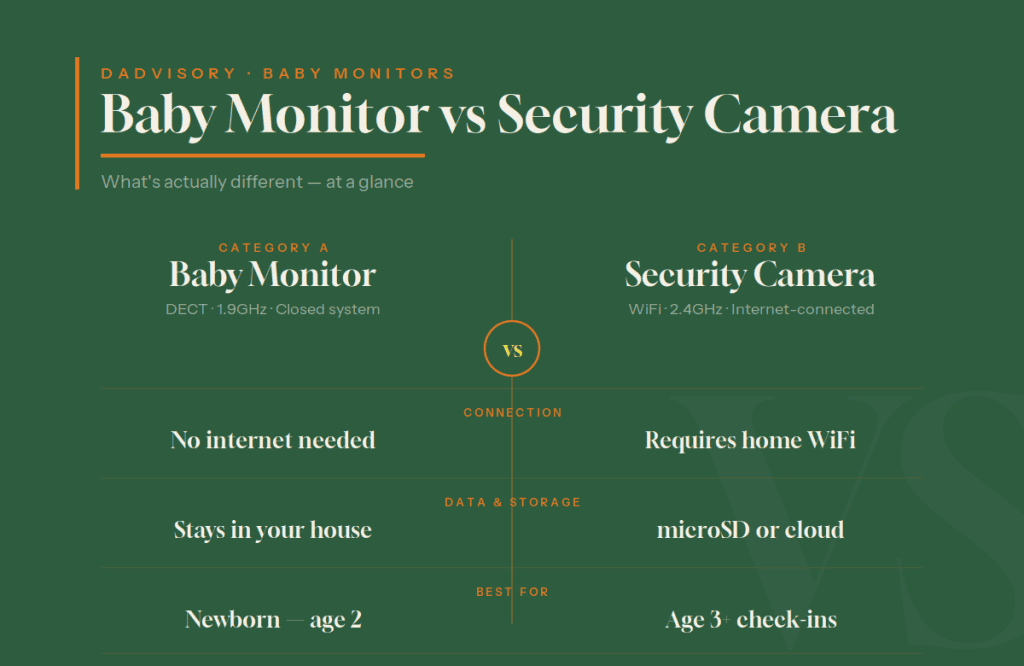
A baby monitor is a closed system. Camera in the nursery, parent unit in your hand or on the bedside table. Most quality UK monitors run on DECT — Digital Enhanced Cordless Telecommunications — at 1.9GHz. That frequency is the same band UK cordless phones use, and it’s reserved by Ofcom specifically for short-range, interference-free domestic use. It doesn’t talk to your WiFi. It doesn’t talk to the internet. It doesn’t need a phone app.
A security camera is the opposite. It connects to your home WiFi. It uploads to a manufacturer’s cloud, or in better cases stores locally on a microSD card. You watch it through a smartphone app — often the same app that controls smart plugs and light bulbs. It’s part of the smart home ecosystem.
That difference in architecture cascades into everything else.
What They’re Designed For
A baby monitor is designed for one job: telling you a small human in a cot needs you, immediately, with zero failure points. Constant audio. Live video on a dedicated parent unit. Often a temperature sensor and a battery in the parent unit so it survives a power cut. The whole thing is engineered for one specific user need over an 18-36 month window.
A security camera is designed for surveillance. Motion zones. Recording on detection. Notifications when a delivery person walks past. Integration with Alexa or Google Home. The use case is “tell me if something happens in this room when I’m not there”.
You can stretch each one to do the other’s job, with caveats. We’ll get to that.
How They Handle Data
This is the part nobody talks about. A DECT baby monitor never leaves your house. The video doesn’t go anywhere. There’s no cloud account, no app, no password to leak.
A security camera by definition has its data flowing somewhere — either staying local on a microSD (good) or going to a cloud service (depends entirely on the manufacturer’s track record). Either way, there are passwords, accounts, firmware updates, and a longer attack surface than a closed-system monitor.
For a newborn? Closed system, every time. For an older child? It depends on what you’re actually trying to do — and we’ll work through that next.
When a Baby Monitor Is Still the Right Choice
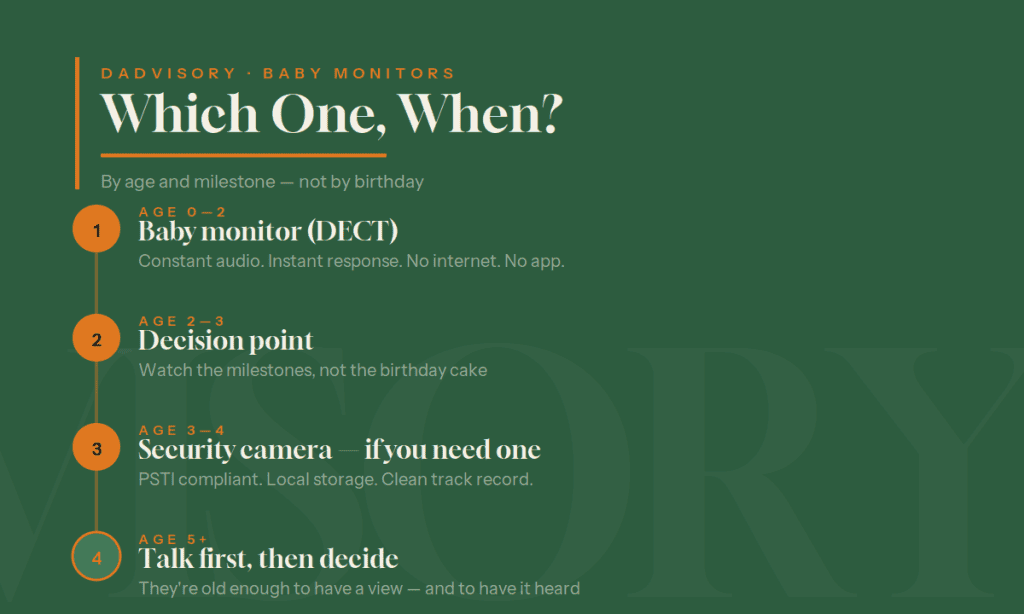
If you’re still in the first two years, the answer is genuinely simple: a baby monitor wins.
Newborns and infants don’t need surveillance. They need a parent who can react in seconds when the breathing pattern changes or the cry tone shifts. A dedicated parent unit, sitting on your bedside table, with constant audio and instant video — that beats fumbling for a phone every time.
Then there’s the UK housing factor. We live in older homes a lot of the time. Solid brick walls 9 to 12 inches thick, party walls between terraced houses, pre-war timber floors. WiFi struggles in those conditions. Your neighbour’s router is on the same channel as yours. The 5GHz signal can’t punch through a Victorian wall. A security camera relying on WiFi is exactly the wrong tool for that environment. DECT, on 1.9GHz, walks straight through — that’s why our Best Baby Monitor for Victorian Houses guide exists in the first place.
There’s also privacy. With a DECT monitor, there’s nothing to hack from the outside. No router exploit gets you to the camera, because the camera isn’t on the router. We covered this in detail in our no WiFi baby monitor guide — the security argument for DECT is the strongest case any monitor type has in 2026.
If you’re still choosing your first monitor, our Best Baby Monitors UK guide covers what’s actually worth buying for British homes.
When a Security Camera Starts to Make More Sense
The shift comes somewhere around three or four. Not on the birthday — the milestones.
Your child sleeps through. They tell you when something’s wrong. They walk themselves to the toilet at 2 a.m. They don’t need an adult lip-reading a grainy night-vision feed to interpret a whimper anymore. The constant audio that justified the parent unit isn’t earning its place.
What you might want instead is occasional check-in. A glance at the room when they’ve gone quiet during play. A look-in if they don’t come down for breakfast. The ability to check the room is empty before you lock the back door at night. That’s surveillance use, not infant monitoring.
A security camera also earns its keep doing other jobs. When your child’s at school, the camera in their room is just a camera in a room — useful if a delivery driver wanders inside, useful for a record if the cat knocks over a lamp. A baby monitor gathers dust at that point. A camera doesn’t.
If you’ve found yourself at the stage where you’re wondering whether to keep using your existing monitor at all, our piece on when to stop using a baby monitor covers the milestones honestly. For some families the answer is “switch to a security camera”. For others it’s “switch to nothing — they’re old enough to come and find you when they need you”. Both are valid.
The UK Privacy Factor Most Articles Miss (PSTI Act 2022)
Here’s where this post is going to be more useful than anything imported from a US site.
In April 2024, the UK enforced the Product Security and Telecommunications Infrastructure Act 2022 — the PSTI Act. It’s the world’s first proper consumer IoT security law, and it applies to anything connected you sell in this country: smart plugs, doorbells, baby monitors, indoor cameras, smart bulbs, the lot.
This matters more than most parents realise.
What PSTI Actually Requires
Three things. Manufacturers must (1) ensure devices ship with unique passwords or force the user to set one — no more “admin/admin” routers and cameras streaming on the public internet. They must (2) publish a clear policy stating how long they’ll provide security updates. And they must (3) provide a security contact so researchers can report vulnerabilities responsibly.
Sounds basic. It is basic. The reason it’s a law is that an enormous chunk of the connected device market wasn’t doing any of these things.
How to Verify a Camera Is Compliant
This is the practical bit. Open the product page on the manufacturer’s UK website. Look for a “PSTI Compliance Statement” or “Statement of Compliance”. TP-Link, for example, publishes one for every Tapo camera they sell in the UK. Yale does the same. If you can’t find one, that’s a flag — either the brand isn’t compliant, or they don’t think UK parents care enough to look.
You can also check the official UK government PSTI guidance for the actual regulations. Worth bookmarking if you’re researching anything connected for the house.
The Brand Track Record Problem
Compliance with the law is the floor, not the ceiling. You also want a manufacturer with a clean recent history.
In February 2025, the New York Attorney General’s office reached a $450,000 settlement with Anker (the parent company of Eufy) over security failures in their connected home cameras. The investigation found that despite Eufy’s marketing claims about end-to-end encryption, camera streams were accessible without authentication, and footage was being uploaded to the cloud despite “local only” promises. This wasn’t a one-off either — researchers had flagged similar issues back in 2022, and the 2025 settlement confirmed the problems hadn’t been fully resolved.
That’s recent. That’s verifiable. That’s exactly why I won’t be putting a Eufy camera in my son’s room, even though they’re widely available on Amazon UK at attractive prices.
For the wider context on what to actually look for in any connected device near your child, our baby monitor security guide walks through the full checklist — most of it applies to security cameras too.
Can You Use a Security Camera as a Baby Monitor?
Short answer: technically yes. Practically, it depends on the age of your child.
For a Newborn – Honest Answer Is No
I’ve seen this advice on a few US sites and it makes me uncomfortable. The reasoning goes: “save £80, just use the smart camera you already have.” For a newborn, that’s a false economy.
A baby monitor’s parent unit doesn’t depend on your phone being charged, your WiFi being up, your notifications being on, or you remembering to open the right app. It just is on, and it’s instant. A WiFi security camera depends on every one of those things working at once. For a six-week-old, every additional point of failure is a real problem.
You also lose the dedicated bits — temperature sensors, lullaby playback if you use that, room sounds without lifting your phone. None of these are dealbreakers individually, but together they’re what makes a baby monitor a baby monitor.
For a newborn: get the proper kit. £40 will buy you a decent DECT monitor that won’t drop a connection at 3 a.m.
For a Toddler+- Yes, But With Caveats
Once your child’s two and a bit, the equation shifts. You’re not relying on instant audio anymore. The camera is for occasional visual checks, not constant supervision.
At that point, a privacy-respecting indoor camera does the job perfectly well. You won’t get the parent-unit experience and you’ll need your phone, but for a child who can come and tell you if they need something, that’s fine.
The caveat: pick a camera you’d be comfortable with regardless of who’s in the room. Local storage. PSTI compliant. No subscription tying you to a manufacturer’s whims. The sections below cover what I’d actually buy.
Can You Use a Baby Monitor as a Security Camera?
Mostly no.
A DECT monitor doesn’t connect to the internet at all, so it can’t be used for any kind of remote viewing or recording. The signal stays in the house, the video stays on the parent unit, and once your child outgrows it the unit is essentially a closed-system relic. That’s a feature for nursery use and a limitation for anything else.
A WiFi baby monitor with an app might technically work as a basic indoor camera, but it’ll be missing the things that make a security camera useful — proper motion zones, scheduled recording, integration with the rest of your smart home. You’d be paying baby-monitor prices (often £150-£250 for the better units) for a worse security camera than a £30 dedicated one.
If you’ve reached the end of the road with your monitor and you’re wondering what to do with it, our piece on when to stop using a baby monitor covers the disposal options properly — including the privacy step most parents skip.
What I’d Actually Buy for My Son’s Room (UK 2026)
After a fortnight of reading specs, settlement papers and PSTI compliance statements, two cameras keep coming up as the right answer for our situation. I’ve not bought yet — we’re going on holiday in a couple of weeks and I want to talk to my son about it first — but here’s what I’ve narrowed it down to.
Tapo C120 — Best Overall (~£30-£40)
The TP-Link Tapo C120 is, for my money, the best indoor camera for a child’s room in the UK right now. Expert Reviews moved it into their top spot in 2026, and going through the spec it’s not hard to see why.
Why it works for this specific use case:
- PSTI Act compliant. TP-Link publishes a Statement of Compliance directly on the Tapo C120 product page. That’s the gold standard — they’re not just compliant, they’re showing you the paperwork.
- Local storage up to 512GB. Stick a microSD in and the footage stays in your house. No cloud subscription required to actually use it.
- No subscription needed. The features that matter — live view, two-way audio, AI detection of people, motion alerts — all work without paying a monthly fee. Tapo offer a cloud option if you want it, but you don’t need it.
- Invisible IR night vision. Critical for a child’s room. Most cameras have a visible red LED at night that some kids find unsettling. The C120 has a starlight sensor for colour night vision and an invisible IR mode for total darkness — no glowing red dot watching them sleep.
- 2K resolution, two-way audio, AI detection for people, pets and vehicles — all built in.
- Magnetic base. Stick it where you want, move it easily.
Tom’s Guide made the point recently that Tapo, unlike Eufy and Wyze, hasn’t had the same kind of high-profile security incidents in recent years. That’s not a guarantee — no manufacturer is bulletproof — but it’s a clean recent track record, which is the best you can ask for.
You can pick it up on Amazon UK from around £30, on the Tapo store at £39.99, and through Currys and other UK retailers. I’ll update this section with my Amazon affiliate link once I’ve bought and tested ours.
Tapo C225 — If You Need Pan/Tilt (~£50-£60)
If your child’s room is bigger than ours, or you want to cover more than one corner, the Tapo C225 is the natural step up. Same Tapo ecosystem, same PSTI compliance, but with pan/tilt motion and one feature I really like for a child’s room: physical privacy mode. When you flag the camera as “home”, it physically rotates the lens down towards the floor. Not just a software toggle — the camera itself shows you it’s not looking. For a child old enough to ask whether they’re being watched, that’s a useful piece of psychology.
There are other reasonable options worth knowing about — Yale Indoor Camera if you want a UK brand with similar credentials, or Reolink E1 Pro if budget’s the dominant factor — but for most UK families the Tapo line is the simplest right answer.
One Brand I Won’t Recommend (and Why)
I’ve already mentioned Eufy. The NY Attorney General settlement in February 2025, on top of the 2022 encryption issues, is enough on its own. They’re cheap and widely available — that’s exactly why they get into people’s homes. I’m not putting one in my son’s room, and I won’t recommend one on this site while my pillar piece is about protecting your family from this exact category of failure.
There are a couple of other brands I’d think twice about — Wyze has had multiple security incidents over the years, and Ring (Amazon-owned) couples a subscription model with a data flow most UK parents probably wouldn’t sign up for if they read the small print — but those aren’t dealbreakers in the same documented, recent way as Eufy. They’re on a “I wouldn’t, but I understand if you do” list rather than a hard no.
Talking to Your Child About a Camera in Their Room
This is the bit I care about most, honestly. The kit is the kit — once you’ve picked one with proper privacy credentials, the hardware decision is made. The harder bit is the conversation.
My son is four and a half. He’s old enough to have a view on whether there’s a camera in his bedroom. Skipping that conversation, in our house, would be a mistake. We try to talk to him like a small adult on most things — why we don’t drink certain juice, why he can’t watch certain programmes, why we go to the workshop together rather than separately. A camera in his room without a chat about it would be a weird exception.
So here’s what I’m planning to actually say, when we get back from holiday:
“We’re thinking about putting a small camera in your room. It’s so we can check you’re safe at night without coming in and waking you up. It’s not on all the time. We’ll show you when it’s on and when it’s off. And if you don’t want it, we won’t put it in. What do you think?”
The frame matters. He can say no. If he says no, we don’t put it in — we go back to him coming to find us, which is what we do now anyway. If he says yes, we walk through together where it goes (not pointing at the bed), what it can see, and how to tell when it’s on. The C225’s physical privacy mode is genuinely useful for this — when the lens rotates down, he can see it’s not looking.
Will he understand it perfectly? No. Does that mean I shouldn’t ask? Also no. He’s four. Four-year-olds notice when grown-ups skip the explanation. Building trust about privacy — when you can absolutely steamroll him because you’re the parent and he can’t argue — is exactly the kind of thing he’ll remember when he’s fourteen and you actually need him to trust you.
This is the piece of intentional fatherhood that most product round-ups skip entirely. It’s also the piece that matters in a decade.

Frequently Asked Questions
Can I use a security camera as a baby monitor for a newborn?
Honestly, no. A WiFi security camera depends on your home network being up, your phone being charged, your notifications being on, and the right app being open. For a newborn, all those failure points stack up. A DECT baby monitor has none of them — it’s a dedicated, closed-system tool that does one job. Save the security camera idea for when your child’s two-plus and you’re using it for occasional check-ins rather than constant supervision.
Baby monitor vs security camera: which is more secure from hackers?
A DECT baby monitor is more secure by design, because it doesn’t connect to the internet at all. There’s nothing to hack remotely. A security camera can be perfectly secure too — but only if the manufacturer’s done their job properly. Look for PSTI Act 2022 compliance, local storage, and a clean recent track record. Avoid brands with documented breaches in the last few years.
What’s the cheapest privacy-respecting camera for a child’s room in the UK?
The TP-Link Tapo C120 at around £30 is genuinely hard to beat. PSTI compliant, local microSD storage, no subscription required, invisible IR for night use. You can spend more — Yale Indoor Camera or Tapo C225 if you want pan/tilt — but you don’t have to spend more to get something privacy-first.
Do I need a security camera if I have a baby monitor?
Not while your child’s small. A DECT baby monitor is purpose-built for the first two to three years. Adding a security camera on top is overkill and adds attack surface for no real benefit. The decision becomes relevant later — somewhere around three or four — when the baby monitor is doing less work and a different tool starts to make sense.
At what age should I switch from a baby monitor to a security camera?
There’s no fixed age — it’s milestones, not birthdays. Once your child sleeps through, communicates clearly, walks themselves to the toilet at night, and understands basic safety rules, the case for a dedicated baby monitor weakens. For most families that’s somewhere between two and four. Some parents skip the security camera step entirely and go straight to nothing — also valid. Your house, your kid, your call.
Conclusion
The honest answer to baby monitor vs security camera is: it’s not the same question for every age. For a newborn, get a proper baby monitor and stop reading articles. For a three-year-old in a multi-storey UK house, the question’s worth asking, and the answer probably involves a PSTI-compliant indoor camera with local storage and a clear privacy story.
For my own son, I haven’t pulled the trigger yet. We’re going on holiday, I want to have the conversation with him properly when we’re back, and I’d rather make the call slowly than rush it. If we go ahead, I’ll update this post with how the Tapo C120 actually performs in real use — including how my four-year-old reacts to having a camera in his room. Worth coming back to in a month or two.
If you’re earlier in the journey, our Best Baby Monitors UK guide is the right next read. If you’ve already decided your monitor’s done its job, when to stop using a baby monitor covers what comes next, including the privacy steps most parents skip when they put the kit in a cupboard.
Either way — pick the tool that matches your child’s actual stage, not the average one. And talk to them about it.