Best Baby Monitor for Victorian Houses: The UK Parent’s Honest Guide
If you live in a Victorian or Edwardian terraced house, you already know the WiFi is a lottery. The broadband engineer comes, tests the signal at the router, nods — and then you discover that two rooms away, the connection drops by half. Add a ceiling, a chimney breast, and a staircase between you and the nursery, and a WiFi baby monitor that promised 300 metres of range starts struggling to cover 30. Choosing the right baby monitor for Victorian house starts with understanding why WiFi struggles here
This is one of the most common complaints I see from UK parents in old properties. They buy a well-reviewed monitor, get it home, and spend the first week watching the connection drop every time they walk to the kitchen.
The problem isn’t the monitor. The problem is the house.
In this guide, I’ll explain exactly why Victorian and Edwardian homes eat WiFi signals, what DECT technology actually is and why it handles thick walls differently, and which monitors are genuinely worth your money if you live in an older UK property. I’ll also be honest about video — because if you’re expecting DECT to solve everything, there are a few things you need to know first.

Why Victorian and Edwardian Homes Are Different
There are approximately 5.7 million Victorian homes in the UK — built between 1837 and 1901. Add Edwardian properties (1901–1910), and you’re looking at around 30–40% of the entire UK housing stock. If you’re renting or buying in any UK city, there’s a reasonable chance you’re in one of them.
What makes them different from modern builds isn’t the aesthetic — it’s the walls.
Victorian terraced houses were built with solid brick construction: typically 9 to 12 inches (23 to 30 centimetres) of dense, fired clay brick. Not cavity walls, not breeze blocks — solid, continuous masonry that was designed to last centuries. And it has. Which is great for longevity and less great for wireless signals.
The Signal Problem in Numbers
Modern WiFi baby monitors typically advertise ranges of 150 to 300 metres. Those figures are measured in open air — outside, line of sight, no obstructions. The moment you add a solid brick wall, you’re absorbing a significant portion of that signal. Two walls? More still. Add a floor, a chimney breast, original wooden lath-and-plaster ceilings, or the presence of old iron pipes — and you’re dealing with compounding signal loss.
Real-world range for a WiFi monitor in a Victorian terraced house is often 30 to 50 metres at best. In a two-up two-down, you might scrape by. In a larger Victorian semi or a house with a baby on the top floor and parents on the ground floor — you’ll know about it.
Edwardian properties share most of the same construction characteristics. Stone-built Victorian homes in Scotland and parts of Northern England can be even more challenging — walls up to 50 centimetres of solid granite.
What Actually Happens to WiFi in Thick Walls
It’s worth understanding the physics briefly, because it explains why the solution isn’t just “get a better router.”
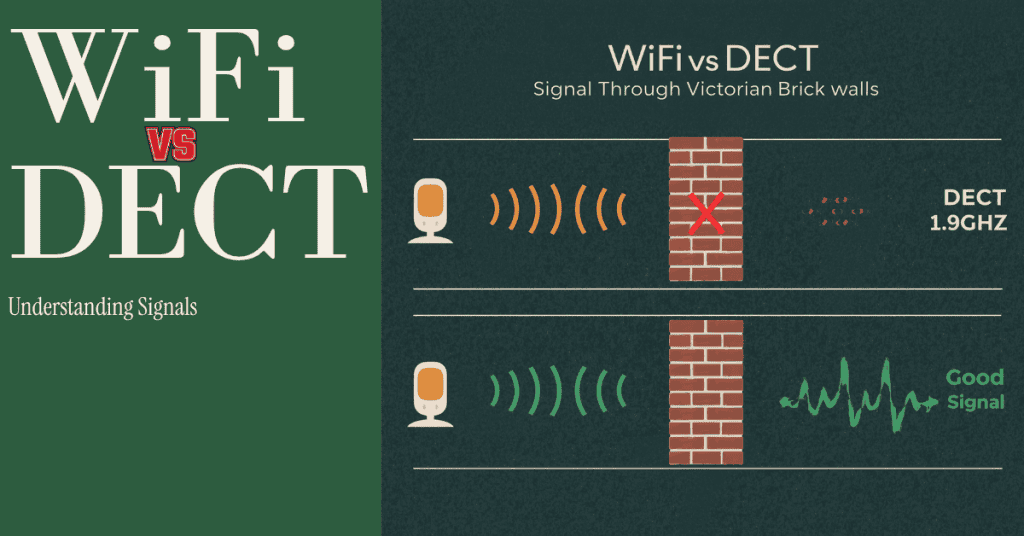
Standard WiFi baby monitors operate on the 2.4GHz frequency band — the same band as your home router, your neighbour’s router, and the half-dozen other networks in any UK terrace street. At 2.4GHz, radio waves lose energy each time they pass through a dense material. The thicker and denser the material, the more energy is absorbed.
A WiFi monitor isn’t transmitting directly to your parent unit — it’s connecting to your home router, which then communicates back. That signal has to make the round trip through your walls every time. In a Victorian house, that’s a lot of brick to push through, on both legs of the journey.
There’s also the interference problem. Ofcom’s research into home WiFi performance shows that urban WiFi environments are saturated with overlapping networks, all competing for the same frequency channels. In a Victorian terrace where you’re sharing walls with neighbours on both sides, the interference adds up. Your monitor isn’t just fighting your own walls — it’s fighting everybody’s routers as well.
DECT: The Technology Built for Old Houses
DECT stands for Digital Enhanced Cordless Telecommunications. You’ve used it for years without knowing — it’s the technology behind traditional cordless landline phones in the UK. That BT handset your parents have had since 2009? Almost certainly DECT.
In the UK and Europe, DECT operates on 1.9GHz — a frequency band legally reserved exclusively for DECT devices. There are no WiFi routers on 1.9GHz, no Bluetooth devices, no microwaves. Just DECT. Which means there’s no interference from anything else in your home or your neighbours’ homes.
But the more important property for Victorian houses is this: lower frequency signals penetrate dense materials better than higher frequency signals. 1.9GHz travels through brick more effectively than 2.4GHz WiFi — the physics simply work in your favour. It won’t perform miracles through a Victorian mansion, but in a typical two-storey terraced house, DECT coverage is consistently better than WiFi.
DECT also automatically hops between frequency channels if it detects interference. And because it’s a closed, encrypted system — the parent unit talks directly to the baby unit, no internet involved — there’s no way for someone to access it remotely.
DECT vs DECT 6.0 — An Important Note for UK Parents
If you’re researching DECT monitors online, you’ll come across “DECT 6.0.” This is a North American standard — used in the US and Canada — and it operates on a different frequency (1.92GHz to 1.93GHz US allocation). DECT 6.0 products are not certified for use in the UK, and you cannot legally operate them here.
When you’re buying in the UK, look for products described simply as “DECT” — without the 6.0. Any DECT monitor sold through UK retailers (Argos, John Lewis, Amazon UK) will be the correct European standard. This distinction matters if you’re buying second-hand or from international sellers.
One more advantage worth mentioning: because DECT monitors don’t connect to the internet, they fall outside the scope of the UK’s PSTI Act 2022 — the regulation governing connected IoT devices and their security requirements. With DECT, there’s simply nothing for a hacker to connect to remotely. If that matters to you, our baby monitor security guide covers exactly why WiFi monitors carry risks that DECT monitors don’t.
Best Baby Monitor for Victorian House and Edwardian Home
For most old UK properties, the honest answer is: DECT audio is your most reliable option. These aren’t glamorous gadgets. They don’t have apps. But they work.
Here are the three I’d recommend, plus an option if movement monitoring matters to you.
A quick word on affiliate links: some links below earn me a small commission if you buy through them, at no extra cost to you. It doesn’t change what I recommend — I only point you at kit I’d consider for my own family, and I’ll tell you when something isn’t worth your money. Full details in my affiliate disclosure.
Best Overall — Tommee Tippee Dreamee
The Tommee Tippee Dreamee is a DECT monitor that gives you video as well as audio, which until recently meant choosing between wall-penetrating signal and a picture. It runs entirely offline — the camera talks to the parent unit directly over DECT, with no router in the middle and no app to install. The camera pans 330° and tilts 110° from the parent unit, and the CrySensor alerts you to crying even when the sound is turned down.
For a solid-brick house, that combination is the point. You get 1.9GHz going
through the walls and a screen at the end of it, rather than settling for audio
because the video options can’t cope with the brick.
Where to buy: Amazon UK, Argos, Superdrug, Currys — check the current price
Best for: Parents in old properties who want video without giving up DECT
Pros: DECT video, fully offline, CrySensor, no subscription ever
Cons: Considerably dearer than DECT audio; the camera lights are bright enough
that some parents tape over them
Check price on Amazon UK.
A Note on BT — the Brand That Isn’t There Any More
If you’ve been researching baby monitors for more than a few weeks, you’ll have
seen BT recommended everywhere. BT made DECT cordless phones in Britain for
decades, their monitors were built on genuinely good foundations, and Argos
sold them by the shelf-load. For a house with solid walls, a British brand with
real DECT heritage was an easy recommendation.
They’ve gone. BT has stepped away from baby monitors and the shelf space has
largely been taken by VTech.
What this means for you: ignore any list still recommending the BT 450, 750 or
6000 as a current buy. Some stock is still floating around and there’s nothing
wrong with the hardware itself, but you’d be buying a discontinued product with
no clear support route. If UK brand reassurance was your reason for choosing
BT, that reason no longer exists — and it’s worth knowing that most of the
guides still pushing it haven’t checked a shelf in two years.
Best Budget — VTech DM1211
If budget is the priority, the VTech DM1211 is the entry point into proper DECT
monitoring in the UK. It’s basic by design: audio only, no screen, five calming
melodies, a backlit display and a belt clip that sounds trivial until you’re
carrying it round the house all evening.
VTech quotes 75 metres indoors and 460 metres outdoors for this one — and that
gap tells you everything about how to read range figures. It’s a six-to-one
difference on the same hardware, and VTech deserves credit for printing both
numbers instead of just the big one. Seventy-five metres is plenty for a
two-up two-down.
Where to buy: Amazon UK, Argos — check the current price
Best for: Budget-conscious parents who want DECT without paying for extras
Pros: cheapest reliable DECT option, simple enough that anyone can use it, out-
of-range alert, good battery life
Cons: audio only, no temperature display
Check price on Amazon UK.
If Movement Monitoring Matters — Angelcare AC25-1
The AC25-1 takes a different approach: an under-mattress sensor pad alongside
video and sound, all running locally with no Wi-Fi, no account and no app. The
pad is included rather than sold separately, which isn’t true of every system
at this price.
If you’re the parent getting up three times a night to check the cot is still
rising and falling, this buys some of that sleep back — and it’s simple enough
that grandparents can work it.
Be clear about what it is, though. A movement monitor is reassurance for you,
not a safety device for your child. It doesn’t prevent SIDS, and following the
Lullaby Trust’s safer sleep advice matters more than anything on this list.
Where to buy: Amazon UK — check the current price
Best for: Parents who want movement monitoring without a Wi-Fi connection
Pros: sensor pad included, fully local, straightforward setup
Cons: picture is soft in low light; the camera has to be running for the pad to
work, so if baby is in a next-to-me crib you’ve got a camera pointed at your
bed all night
Check price on Amazon UK.
What If You Need a Video Baby Monitor?
This is where I’ll be straight with you, because there are a lot of optimistic reviews out there.
Most video baby monitors — the ones with a separate screen, no app — use FHSS (Frequency Hopping Spread Spectrum) at 2.4GHz. FHSS is better than WiFi in some respects: it doesn’t connect to the internet, it’s encrypted, and it hops between frequencies to reduce interference. But it’s still 2.4GHz, which means it faces the same physics problem as WiFi when it comes to thick Victorian walls.
In a modern house, FHSS video monitors are fine. In a Victorian terraced house with solid brick floors and walls, you may still have range issues — less severe than a WiFi monitor, but not eliminated.
Before we get into the FHSS options: if you’ve skipped straight to this section, go back and read about the Tommee Tippee Dreamee above. It’s the one video monitor here that runs on DECT rather than 2.4GHz, which means it’s the only one that actually solves the brick problem instead of coping with it. It costs less than the VTech below. If video in a solid-brick house is your requirement, that’s the answer, and everything that follows is a compromise.
The two below are here because DECT video is a category of one, and sometimes you want a bigger screen or the option of checking your phone. Just go in knowing what you’re trading away.
If budget matters more than screen size, there’s also the HelloBaby HB6550 — no WiFi, no app, and the budget video monitor I’ve covered in the most depth in my full HB6550 review. It’s the same 2.4GHz FHSS trade-off as the two below, and solid brick is its weak spot, so I’d see it as a pick for the lighter-walled parts of an old house rather than a fix for the thickest walls. If you’re deciding between it and the 6-inch model, HB6550 vs HB6560 explains why the bigger screen isn’t the upgrade it looks like.
VTech VM7467 — a 7-inch screen running on 2.4GHz FHSS with no network, no app
and no account. Pan, tilt and 4x zoom from the parent unit, plus a temperature
readout. It’s the simplest of the video options: nothing to set up, nothing to
log into. Still 2.4GHz, so the brick is still the brick — but the closed link
handles it better than a WiFi monitor bouncing off your router.
Check price on Amazon UK.
eufy Baby Monitor E21 — a hybrid, but the sensible way round. There’s a
physical switch that cuts Wi-Fi off entirely and drops the monitor into local
FHSS mode: no app, no cloud, nothing to reach in from outside. Leave Wi-Fi on
and you get phone access and 24/7 recording. 4K camera, though the parent unit
screen is 720p, so the resolution only really shows when you zoom in the app.
Two honest caveats. Eufy doesn’t put the local-mode frequency anywhere in the
spec sheet — I found it on their own blog, not the product page, and it’s the
same 2.4GHz FHSS as everything else here, so treat that switch as a privacy
feature rather than a fix for thick walls. And Eufy had a security controversy
in 2022 worth reading up on before you commit to any of their cameras.
Check price on Amazon UK.
If you genuinely need video in a challenging Victorian property, my practical advice is this: buy FHSS over WiFi, test it thoroughly in the first two weeks, and have a plan B. For many layouts it’ll work fine. But if you hit dead zones, DECT audio is more reliable — and your ears are often enough to know if something’s wrong.
Practical Setup Tips for Victorian and Edwardian Homes
Getting the right monitor is half the job. Where and how you place it matters too.
Before you buy: Count the walls and floors between the baby’s room and where you’ll spend most of your time. Two solid brick walls and a Victorian floor with original joists is significantly more challenging than one internal partition wall.
After you buy: Walk every room in the house with the parent unit. Find the dead zones before you rely on the monitor. Most properties have them — a back corner of the kitchen, the far end of the garden — and knowing where they are means you’re not caught out.
Unit placement:
- Position the baby unit away from external walls — the closer it is to the exterior, the more brick signal has to push through
- Keep it towards the middle of the room, or near the door
- Avoid placing it near cast iron radiators or old metal pipework — both absorb signal
Antenna: If your monitor has an external antenna, keep it vertical. Lying it flat significantly reduces range.
If you’re still losing signal: Some DECT monitor ranges include compatible repeaters that extend coverage. Check before you buy if your property is large or complex.
Our house is actually a new build, not a Victorian terrace. But even here, WiFi didn’t reach every corner reliably — the garage, parts of the ground floor. That, along with the security angle, is what pushed us toward a no-WiFi monitor from the start. The DECT signal was strong throughout: upstairs, downstairs, garage, garden. If that’s what we’re getting in a modern build, the physics for DECT in a Victorian home makes complete sense to me. For more on the full setup process, our baby monitor set up guide walks through placement, testing and first use in detail.

Baby Monitors for Victorian Houses: Your Questions Answered
Does DECT work through thick Victorian walls? Yes — better than WiFi. DECT operates at 1.9GHz, which penetrates dense brick more effectively than 2.4GHz WiFi. It won’t give you unlimited range through several solid walls, but for the typical Victorian terraced house layout — two or three floors, baby upstairs, parents downstairs — DECT audio monitors consistently outperform WiFi alternatives. Real-world range through Victorian brick is typically 30–80 metres depending on the property.
What range do I need for a Victorian terraced house? For a typical two-up two-down, any DECT monitor rated at 150m+ outdoors will provide sufficient indoor coverage. Larger Victorian properties — four storeys, solid stone construction — may challenge even DECT. In those cases, test thoroughly in the first two weeks and consider a model with repeater support. Don’t rely on advertised range figures — they’re always outdoor, line-of-sight measurements.
Can I use a WiFi baby monitor in an old house? You can try, but the results are inconsistent. WiFi monitors depend on your home router signal reaching the baby unit and back — through solid Victorian brick, that connection degrades significantly. Some properties will be fine; others won’t. If you want a reliable connection from day one, DECT is the lower-risk choice for old UK properties.
What’s the difference between DECT and WiFi baby monitors? WiFi monitors connect to your home internet network and stream audio/video via your router. They offer app control and remote access, but depend on WiFi signal strength and carry security risks. DECT monitors communicate directly between baby unit and parent unit on a private 1.9GHz frequency — no internet, no app, no interference from neighbouring networks. For old UK houses, DECT’s direct radio link handles thick walls more reliably than WiFi.
Are DECT baby monitors safe? Yes. DECT operates on a frequency band reserved exclusively for DECT devices in the UK — no overlap with WiFi, Bluetooth, or other consumer electronics. The signal is encrypted, the system is closed (no internet connection), and DECT technology has been in safe, widespread domestic use in the UK for over 30 years. It’s the technology in most UK cordless landline phones.
The Bottom Line for Victorian and Edwardian Homes
Finding the right baby monitor for Victorian house comes down to one thing: forget WiFi.
You might get lucky with your specific layout. But the solid brick construction, thick floors, and often complex room arrangements in old UK houses create exactly the conditions where WiFi signal degrades. DECT was designed for these environments — lower frequency, dedicated spectrum, no competing networks, direct unit-to-unit connection.
For most parents in older properties, my recommendations break down simply:
- DECT with a screen, best overall: Tommee Tippee Dreamee
- Tight budget, audio only: VTech DM1211
- Movement monitoring too: Angelcare AC25-1
- Video, simplest option: VTech VM7467 (FHSS — test thoroughly)
- Video with optional app access: eufy E21 (hybrid, Wi-Fi switch)
- UK brand heritage: no longer an option — BT has left the market
We went with a DECT audio monitor and haven’t regretted it. Clear signal, no dropouts, no app to manage, and nothing connected to the internet. Sometimes the simple solution is the right one.
If you want to understand the security side of why WiFi monitors carry more risk than most parents realise, the baby monitor security guide is worth reading before you buy. And if you’re still deciding between DECT and other no-WiFi options, the baby monitor without WiFi guide covers the full range of alternatives.
For the complete comparison of UK baby monitors at every price point, the Best Baby Monitors UK guide has all the options in one place.