Best Baby Monitor for Large House UK: What Actually Covers a Detached Home

As an Amazon Associate I earn from qualifying purchases, and I may earn a small commission from Argos, John Lewis and other retailers too — always at no extra cost to you. It never changes what I recommend: I only point you towards kit I’d genuinely use in my own home, and I flag the duds just as honestly as the good ones. Prices and availability were correct at the time of writing but can change.
You’re in the kitchen. The kettle’s on, the washing is going round, and the parent unit on the worktop starts flashing out of range. Your child is asleep three rooms and a staircase away, and for about four seconds you have no idea whether they’re breathing or screaming.
I know that four seconds. We live in a new build — nothing like a rambling detached place — and even here, the video monitor we had at the time held the signal upstairs, held it diagonally across the ground floor into the kitchen, and then dropped dead at the garden gate, roughly nine metres from the house. Nine metres. In a modern build with thin walls.
Now stretch that house out. Add a third storey, a garage, a kitchen extension and a lawn you actually sit on. That’s the problem this guide solves, and it’s a different problem from thick walls. Choosing a baby monitor for large house use isn’t about punching through brick — it’s about distance, floors and the number of places you genuinely spend time.
The short version: in a big home, the monitor is rarely the fault. The fault is buying a one-point system for a multi-point house.
What Counts as a “Large House” in the UK?
Nobody defines this, which is why every guide gets it wrong. “Large home” in an American article means something completely different from what it means in Britain.
According to the English Housing Survey, the average home in England is somewhere around 94–96m². A detached house averages roughly 149m². Rural homes run to about 123m² against roughly 80m² in urban areas, and London has the smallest homes in the country at around 84m². A four-bedroom house sits at a median of about 138m², with older detached properties commonly landing between 160m² and 200m².
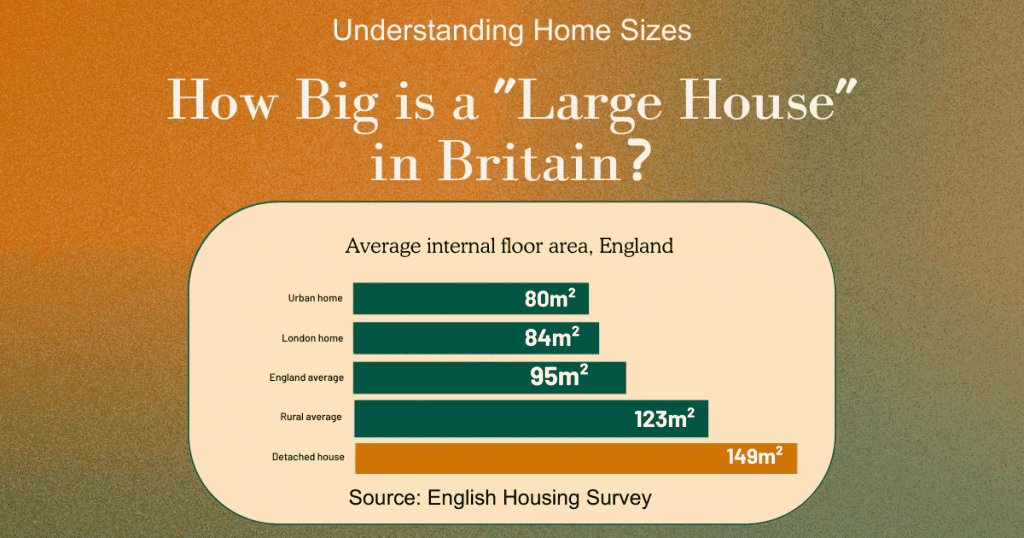
So a “large house” in Britain is realistically one and a half to two times the national average — usually detached, often rural, and very often three levels once someone’s converted the loft.
But the metres aren’t really the point. There are three different large houses in this country, and they break monitors in three different ways.
The detached family home
Two storeys, roughly 149m², a garage on one side and a garden at the back. The nursery is upstairs at the front; you’re in the kitchen at the back, or in the garage, or hanging washing out. The signal has to travel diagonally through a floor and then out through an external wall. This is the most common version of the problem and the easiest to fix.
The three-storey townhouse or loft conversion
This one catches people out. The footprint might be modest — narrow, even — but you’ve got the nursery on the first floor and your office in the converted loft, or the living room in a basement kitchen-diner. The signal isn’t travelling across the house, it’s travelling up and down through two floors. Every floor is joists, insulation, plasterboard and often a concrete or screed layer. Two floors will cost you more signal than four internal walls.
If your large house also happens to be a period property, you’ve got both problems at once — walls and distance — and the wall side of it is covered in our guide to baby monitors for Victorian houses.
The extended house
Rear extension, side return, kitchen-diner across the back. On paper it’s a semi. In practice the spot where you stand every evening is now the single furthest point in the building from the nursery, and it’s usually separated by what used to be an external wall — thicker, denser, sometimes with a cavity and insulation.
The rule that matters: it isn’t the floor area, it’s the furthest point you actually spend time in. Measure from the cot to that point, not from the cot to the front door.
Why Advertised Range Numbers Collapse in a Big House
The number on the box was measured in a field, in a straight line, with nothing in the way. Your house is not a field.
In a large home there’s a second problem on top of that: floors are worse than walls. An internal stud wall is plasterboard and air. A floor is joists, boards, insulation, pipes, cables and — in newer or converted properties — a layer of screed. Sending a signal up through two of those is a much bigger ask than sending it sideways through two partitions.
I’ve pulled apart what the advertised figures actually mean, model by model, in our piece on how far baby monitors really reach in British homes. For here, one line is enough: treat the box number as marketing and assume you’ll get a fraction of it indoors.
Which Technology Actually Covers the Distance
Four technologies show up on UK shelves, and they are not equivalent when distance is your problem. Picking a baby monitor for large house coverage starts here, because the band it runs on decides more than any feature printed on the box.
| Technology | Band | Real-world range in a house | Best for |
|---|---|---|---|
| PMR | 446 MHz | Longest of the four, audio only | Big plots, gardens, outbuildings |
| DECT | 1.9 GHz | Very good, usually audio | Most large homes |
| FHSS | 2.4 GHz | Good, video with a screen | House plus video, no Wi-Fi |
| Wi-Fi / app | 2.4 / 5 GHz | Depends on your mesh, not the monitor | Homes with proper mesh coverage |
DECT and Wi-Fi deserve more than a table row, and I’ve given them a full one in the no-Wi-Fi monitor guide rather than repeating it here. The one-line version: DECT sits on a protected 1.9 GHz band nobody else uses, which makes it stable; Wi-Fi has no range limit of its own but inherits every weakness your router has.
PMR is the one nobody tells you about. It’s the walkie-talkie band — 446.0 to 446.2 MHz — and Ofcom exempts it from licensing, so anyone can use it. The lower the frequency, the further the signal travels, and 446 MHz is far lower than 1.9 GHz DECT or 2.4 GHz Wi-Fi. On paper that’s transformative for a big plot.
In practice, be careful. The standard caps output at 500 milliwatts with a fixed aerial, and the band is shared across sixteen channels, so you can pick up other people’s traffic. The realistic figure in a built-up area is a few hundred metres to a couple of kilometres, not the headline number. The one PMR baby monitor on the European market — Luvion’s Icon Long Range — quotes up to 3km, which is an open-field figure like every other open-field figure in this category. It also isn’t stocked by Amazon UK, Argos or John Lewis, so buying one in Britain means importing it. I mention it because the technology is genuinely interesting for anyone with a paddock, not because I’d send you chasing it.
The Wi-Fi paradox in large homes
Here’s the awkward bit. Everywhere else in this cluster I lean towards non-connected monitors. In a genuinely large house with a well-set-up mesh system, a Wi-Fi monitor is sometimes the only thing that reaches every corner — because the mesh nodes are already doing the hard work of carrying signal across the building, and the monitor just piggybacks on that.
That’s a real advantage and I won’t pretend otherwise. But it comes with a real cost: an internet-connected camera in your child’s bedroom carries a category of risk a closed DECT link simply doesn’t. If you go that route, go in with your eyes open and read what a Wi-Fi monitor actually means for security first. It’s a trade-off, not a free lunch.
Where Large UK Homes Actually Lose Signal
Every big house has the same handful of black spots, and they’re almost never the ones people test first:
- The furthest ground-floor corner, or the rear of a kitchen extension
- The garage and utility room — usually an external wall plus a metal door
- A converted loft used as an office
- The cellar
- The garden, the shed, the garden office
The five points to test in a big house
I’ve set out how to run a proper walk test — the method, the timing, what to write down — in the range guide, so I won’t repeat it. What that guide doesn’t do is tell you which stops to include when your house is big, and this is where people go wrong: they walk to the sofa, it works, they’re happy.
Add these five to your route: the furthest ground-floor corner, the garage, the top of the loft stairs, the back of the extension, and the garden gate. Those are the points where a large house actually fails.
Do it within the first fourteen days, while the returns window is still open. Finding out in week five that the monitor dies in the garage is a much more expensive discovery than finding out on day two.
Five Fixes, Cheapest First
Before you replace a baby monitor for large house coverage, work down this list in order. Two of these cost nothing.
1. Move the baby unit and stand the aerial up. Central in the room, away from external walls, aerial vertical rather than flat. It’s free and it’s frequently enough on its own — where the baby unit should actually sit covers the positioning properly.
2. Add a second parent unit from the same range. Far cheaper than replacing the system, and it solves a completely different problem from a repeater (see below).
3. Add a repeater — but check compatibility before you buy, not after. Only some DECT ranges support one, and the repeater has to be from the same series. This is the single most common wasted purchase in this category: people buy a generic “signal booster” and discover it does nothing for a monitor.
4. Move to an expandable two-to-four camera system. If your child naps downstairs and sleeps upstairs, or you’ve got two children in two rooms, extra cameras beat extra range every time.
5. Mesh Wi-Fi plus a Wi-Fi or hybrid monitor. The expensive option, and the one that actually works in a very large house — provided the mesh is properly set up first. Fix the network, then fix the monitor.
Second parent unit or a repeater?
These get treated as interchangeable and they solve opposite problems.
A repeater fixes one dead zone on one route. It sits between the baby unit and the place the signal dies, and rebroadcasts. If your problem is “it cuts out in the garage, everywhere else is fine”, a repeater is your answer.
A second parent unit fixes two people in two places. If you’re in the loft office and your partner is in the kitchen, no amount of repeating helps — you need two receivers. If your problem is “one of us always ends up without it”, buy the second handset.
Get this wrong and you’ll spend money on the right kit for the wrong fault. Ask yourself which sentence describes your evening, then buy accordingly.
The Best Baby Monitor for Large House Coverage: Five UK Picks for 2026
Five options that hold up over distance. I haven’t personally tested every one of these — I’ve owned two monitors, both in a new build — so where I’m going on specification and UK owner reports rather than my own hands, I’ll say so.
Motorola VM75 — the range pick. FHSS on 2.4 GHz with a five-inch screen and no subscription. It’s the strongest range-for-money option I’ve come across for detached homes and properties with outbuildings. Downside: FHSS shares the 2.4 GHz band with your router, so in a dense neighbourhood DECT is cleaner, and there’s no pan or tilt. I’ve written it up in full in our guide to monitors with no monthly fees. Expect somewhere in the mid-range price bracket at the time of writing. Check the current price on Amazon UK.
Babysense MaxView 2-Cam — the two-rooms pick. A 5.5-inch split screen with two cameras and no Wi-Fi. If your large house means two sleep locations — a nursery upstairs and a nap spot downstairs, or two children — this is cleaner than trying to make one camera stretch. Downside: two cameras is two power points and two things to position, and the split screen is smaller than it looks in the photos. Check the current price on Amazon UK
VTech VM819 / VM3250 — the battery pick. These run for long stretches off the parent unit battery, which is what you want if you’re carrying it between three floors all evening rather than leaving it docked. Downside on the VM819: the screen is small, there’s about a second of lag, and the camera’s green LED stays lit in a dark room. I’ve gone through both in the VM819 review. Check the current price on Amazon UK.
Angelcare AC25-1 Movement Monitor — the reassurance pick. Video, sound and a
sensor pad that goes under the mattress, all running locally: no account, no
app, no firmware update at bedtime. The pad is included rather than sold
separately, which isn’t true of every system at this price. If you’re the
parent getting up three times a night to check the cot is still rising and
falling, this buys some of that sleep back — and it’s simple enough that
grandparents can work it. Downsides: the picture is soft in low light, and the
camera has to be running for the pad to work, so if baby is in a next-to-me
crib in your room you’ve got a camera pointed at your bed all night. Be clear
about what it is, too — a movement monitor is reassurance for you, not a
safety device for your child. It doesn’t prevent SIDS, and following the
Lullaby Trust’s safer sleep advice matters more than anything on this list.
Check the current price on Amazon UK.
Philips Avent Connected Baby Monitor (SCD951) — the Wi-Fi pick. HD picture,
cry detection, and around twelve hours of screen time in Eco mode, which is
the difference between a parent unit that survives the night and one that
doesn’t. Pair the app and range stops being a distance problem at all — it
becomes a coverage problem, which in a large house is your mesh network’s job,
not the monitor’s. Downside, and it’s the one that matters here: this is Wi-Fi
only, with no local fallback. If the router drops at 2am — and in a big house
the nursery is often served by a mesh node two rooms away — the monitor drops
with it. Buy this if you already trust your network. If you don’t, fix the
network first; no monitor will fix it for you.
Check the current price on Amazon UK.
One Honest Word About Distance and Safety
A large house creates a temptation, and I’d rather name it than sell around it.
When you’ve got a spare room at the quiet end of the landing, it’s tempting to put the baby there — away from the telly, away from the front door — and let the technology bridge the gap. The Lullaby Trust advises that for the first six months a baby should sleep in the same room as you, for naps in the day as well as at night. That advice doesn’t change because your house is big enough to make it inconvenient.
A monitor is a convenience device. It is not a safety system, and no amount of range turns it into one. Choosing a baby monitor for large house coverage is a question about your washing-up, your garage and your garden — not a question about how far away your newborn can safely sleep.
I’d rather lose the sale than have you read that the other way round.

FAQ
Does a baby monitor for large house use need more than one camera? It’s not about size — it’s about sleep locations. One camera is fine for any house, however large, if the child only ever sleeps in one room. The moment there’s a second regular sleep spot — a downstairs nap, a second child, a travel cot in your room — a second camera beats trying to stretch one further.
Do baby monitor repeaters actually work? Yes, when they’re the manufacturer’s own repeater for that specific series, and when the problem is a single dead zone rather than general weakness. Generic “signal boosters” do nothing for a monitor. Check compatibility on the manufacturer’s site before you buy, because most ranges don’t support one at all.
Will mesh Wi-Fi fix baby monitor coverage in a large house? Only if you’re using a Wi-Fi or hybrid monitor. Mesh does nothing for a DECT or FHSS unit, which never touches your network. But for a Wi-Fi monitor, mesh is usually the actual fix — the monitor was never the bottleneck, your router’s reach was.
Will a baby monitor reach the garden? Sometimes, and less far than you’d think. The signal has to clear an external wall first, which costs more than any internal wall. Mine died about nine metres past the kitchen door in a modern build. Test to the furthest point you’d actually sit, not just to the back step.
Can I use one monitor for two rooms in a large house? Not simultaneously with a single camera. Expandable systems cycle between cameras or split the screen; some parent units scan automatically every few seconds. If you need genuine simultaneous coverage of two rooms, buy a split-screen two-camera set rather than a single-camera system with a second unit added later.
Does a three-storey house need a different monitor than a wide bungalow? Yes. Floors cost more signal than internal walls, so a three-storey home is the harder job even at a smaller footprint. For vertical homes, prioritise a strong DECT or hybrid unit and put the baby unit high in the room. For a wide bungalow, everything is on one level, and central positioning plus a decent 2.4 GHz video unit is usually enough.
Where I’d Start
If you don’t want to read all of that: pick a baby monitor for large house use that supports a second parent unit, set it up the day it arrives, and walk those five points — furthest corner, garage, loft, extension, garden gate — before the returns window closes. Nine times out of ten that tells you whether you’ve got a positioning problem or a purchase problem, and the two have very different price tags.
If you’re still narrowing the field, our full guide to choosing a baby monitor in the UK has the whole picture — budget, features, cameras and everything else.